
RGB lighting shows off a desk, and it shows off every loose cable too. Cable management is the difference between a setup that looks finished and one that looks half done. Work from the floor up.
Step 1: Get the power strip off the floor
Most cable mess starts at the power strip. Put it in a tray under the desk and every cable gets a short, hidden run to it. Clamp-on trays, like the Scanfield and Xpatee, need no drilling, which matters on rented desks.

Scanfield Cable Management Tray, 17-Inch, 2-Pack
Keep your desk clutter-free with these easy-to-install cable trays.
Product information
Product Review Score
4.23 out of 5 stars
(142 reviews)Product links

Xpatee Cable Management Under Desk Tray
Keep your cables organized and out of sight with this sturdy tray.
Product information
Product Review Score
4.77 out of 5 stars
(107 reviews)Product links

VIVO Black Under Desk Cable Management Tray
Keep your workspace neat with this sleek under desk cable tray solution.
Product information
Product Review Score
4.43 out of 5 stars
(226 reviews)Product links
Step 2: One path down to the wall
Only one or two cables should need to leave the desk: power to the wall, and perhaps a network cable. Bundle them and send them down one path. On a standing desk, a cable spine flexes as the desk moves up and down.

Ultimate Setup Under Desk Cable Management
This cable management system keeps your workspace neat and organized with ease.
Product information
Product Review Score
4.72 out of 5 stars
(48 reviews)Product links
For runs along the back of the desk or up a desk leg, a raceway covers the cables completely.
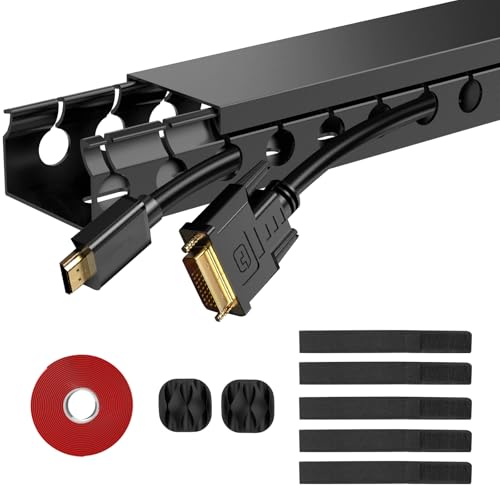
ENONCI Cable Raceway 77in Wire Covers
Organize and conceal all your cables for a cleaner workspace.
Product information
Product Review Score
4.19 out of 5 stars
(53 reviews)Product links
Step 3: Clip the cables that move
Charging cables, the mouse cable and headset leads are the ones that slip down behind the desk. Adhesive clips along the desk edge hold them in place and let you pull them out when you need them. Magnetic clips make it quick to take a cable out and put it back.

JOYROOM Magnetic Cable Clips Organizer 9 Pack
Keep your cables neat and accessible with this innovative cord organizer.
Product information
Product Review Score
4.33 out of 5 stars
(141 reviews)Product links

SOULWIT Self Adhesive Cable Management Clips
Tame your cables effortlessly and keep your workspace organized without the messy tangles.
Product information
Product Review Score
4.29 out of 5 stars
(131 reviews)Product links
Step 4: Tie the bundles
Hook and loop ties suit a desk better than zip ties. You can open them again when you add a new device, and they are gentler on cables.

VELCRO Brand ONE-WRAP Cable Ties, 100 Pack
Stay organized and eliminate messy cables with these handy ties for home or office.
Product information
Product Review Score
4.56 out of 5 stars
(115 reviews)Product links
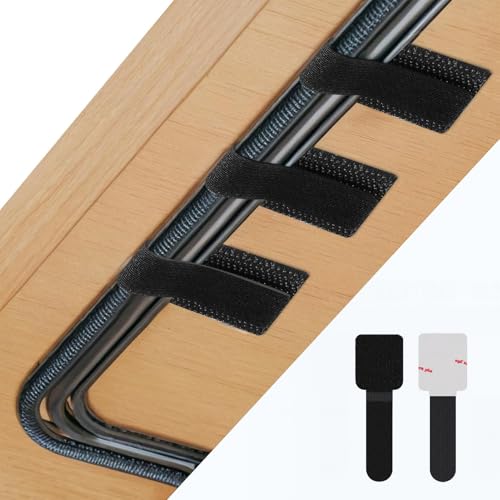
Abnii Hook and Loop Cable Ties Set
Easily organize your cables with these flexible adhesive ties that stick securely to surfaces.
Product information
Product Review Score
4.23 out of 5 stars
(61 reviews)Product links
If you would rather buy everything at once, a kit covers clips, ties and a power strip holder in one box.

Battlestation Cable Organizer Kit 114PCS
Transform your gaming setup with this all-in-one cable management kit for a cleaner workspace.
Product information
Product Review Score
4.68 out of 5 stars
(43 reviews)Product links
Step 5: Lift the monitor
A monitor arm frees the space under the screen, and many arms have cable clips or channels so the monitor cables run along the arm down to the tray. From the front, it is the change that makes the biggest difference.

HUANUO FlowLift Single Monitor Mount
Adjust this ergonomic monitor mount for the best viewing experience with ease.
Product information
Product Review Score
4.24 out of 5 stars
(206 reviews)Product links

Amazon Basics Gas Spring Monitor Arm Mount
Easily adjust your monitor with this sturdy gas spring mount for optimal viewing angles.
Product information
Product Review Score
4.68 out of 5 stars
(30 reviews)Product links
Find more trays, raceways and clips in Cable Management, and arms in Monitor Arms.


